What Is winmail.dat? Why Outlook Sends It and What Is Inside
winmail.dat is the TNEF part of an Outlook message that your mail program could not read. Following Microsoft's documentation and the MS-OXTNEF specification: when Outlook sends it, why some recipients see it and others do not, what is inside, and how to open or stop it.
Just want the attachments out?
The winmail.dat viewer on this site shows the subject, sender and body and lets you save the files inside.
The file is read in your browser and is not uploaded.
A winmail.dat is the part of an Outlook message that your mail program could not read. Outlook, or the Exchange server behind it, packed the message's formatting, and possibly its attachments, into a Microsoft format called TNEF, and your mail program, not knowing that format, showed the package as a file. The text of the message usually arrives beside it as plain text.
The same thing can arrive under other names: Microsoft mentions Win.dat, and generic names such as ATT00008.DAT or ATT00005.eml when the mail program does not recognise the part at all.
TNEF, the format inside
TNEF stands for Transport Neutral Encapsulation Format. Microsoft's Exchange documentation describes it as "a Microsoft-specific format for encapsulating MAPI message properties", also known as Outlook Rich Text Format or Exchange Rich Text Format. MAPI properties are how Outlook and Exchange store everything about a message: subject, sender, body in several forms, attachments, meeting details and so on.
Internet mail has no place for most of those properties, so TNEF flattens them into one stream of bytes that can travel through a system that does not support them and be unpacked at the other end. That is the purpose Microsoft's specification gives it. The stream can be sent as a file attachment named winmail.dat, as a MIME part of type application/ms-tnef, or appended to a plain-text body with UUENCODE.
The format is Microsoft's own, but it is not secret. Microsoft publishes it as an open specification, [MS-OXTNEF], whose earliest listed version is dated April 2008. Every TNEF stream begins with the same four bytes, which is how software recognises one whatever the file is called:
78 9F 3E 22(The specification writes this signature as the number 0x223E9F78; the bytes are reversed in the file because TNEF stores numbers little-endian.)
When Outlook sends it
Outlook can write a message in HTML, plain text or Rich Text. Microsoft's support article says Outlook sends HTML by default, and that for Rich Text it "uses Transport Neutral Encapsulation Format (TNEF) to package message information". If the recipient's system cannot process TNEF, the recipient gets an attachment named Winmail.dat.
A Rich Text message does not always leave as TNEF. Microsoft's Exchange documentation describes three places that decide what happens to a Rich Text message sent outside the organisation, the higher one overriding the lower:
- The organisation's remote domain settings (an Exchange administrator's setting for mail to a given domain): Always uses TNEF, Never does not, and the default, Follow user settings, leaves it to the levels below.
- Mail user and mail contact settings on the Exchange side: Always, Never, or the default, which defers to the other settings.
- The sender's Outlook. Its Internet message format option decides what happens to Rich Text sent to external recipients. The default is Convert to HTML format; with Send using Outlook Rich Text Format the message stays TNEF. Outlook 2010 and earlier also have a per-contact setting, and a message to a contact set to Send using Outlook Rich Text format stays TNEF.
On top of that, Microsoft lists Outlook features that require TNEF: meeting requests and responses, voting buttons, task requests, rich text formatting and embedded attachments. A message using one of them can go out as TNEF even when the default format is HTML. Ordinary file attachments do not need TNEF, and Microsoft recommends choosing HTML or plain text by hand when sending attachments to someone who does not use Outlook.
In practice, then, a winmail.dat usually means a Rich Text message, a TNEF-only feature, or a setting somewhere that keeps Rich Text as TNEF. The steps for each are in How to Prevent Winmail.dat.
Why some recipients see it and others do not
Whether you see a winmail.dat depends on what your mail goes through, not only on the sender:
- Outlook and Outlook on the web read TNEF. Microsoft's Exchange documentation says all versions of Outlook fully support it, and that Outlook on the web translates it and shows the formatted message. People reading their mail in Outlook therefore usually see no winmail.dat, which makes it easy for the sender not to notice.
- Mail programs that do not support TNEF typically show the plain-text version of the message with Winmail.dat or Win.dat attached, according to the same documentation.
- Mail servers may remove the TNEF part on the way. Microsoft says this is common and gives Exchange Server as an example of a server that can do it; the recipient then gets the plain-text version only, with no winmail.dat, but also without what was inside it.
So two people receiving the same message can see three different things: the full formatted message, plain text with a winmail.dat, or plain text alone.
What is inside
Microsoft's support article lists what a Winmail.dat might include:
- the formatted version of the message (fonts and colours);
- OLE objects, such as embedded pictures and embedded Office documents;
- Outlook features, such as custom forms, voting buttons and meeting requests;
- the ordinary file attachments the sender added.
The last item is what usually matters: the PDF or spreadsheet the sender attached is in the winmail.dat, not missing. The same article adds that the path of the sender's personal folders (.pst) file and their sign-in name are embedded in the file; a recipient who opens it in a text or binary editor can see them, though no password is included.
The plain-text body is normally not in the winmail.dat at all. When TNEF travels as a MIME part, the specification says the plain-text body is sent in its own MIME part instead, which is why the text of the message still reaches you.
Inside, the file is a flat run of records called attributes. After the signature comes a legacy key, a version and the code page used for text, then attributes for the message followed by a group of attributes for each attachment. Each attribute says whether it belongs to the message or to an attachment, what it is, how long it is, then its data and a 16-bit checksum. A few of them, from [MS-OXTNEF]:
| Attribute | Level | Holds |
|---|---|---|
attSubject | Message | The subject |
attMsgProps | Message | Any number of MAPI properties of the message, including the formatted body |
attAttachRendData | Attachment | Starts each attachment; says whether it is a file or an OLE object |
attAttachTitle | Attachment | The file name |
attAttachData | Attachment | The file itself |
attAttachment | Attachment | MAPI properties of the attachment, such as its long file name. Attached emails and OLE objects are stored here rather than in attAttachData |
The formatted body travels as a MAPI property inside attMsgProps. In the sample message in [MS-OXTNEF] it is PidTagRtfCompressed: RTF compressed with an algorithm Microsoft also publishes ([MS-OXRTFCP]). The compression saves space and protects nothing. RTF here does not necessarily mean the message was written as Rich Text: another Microsoft specification ([MS-OXRTFEX]) describes how an HTML or plain-text message is wrapped in RTF so that the original can be recovered from it.
The byte-level details, and what breaks a first attempt at reading them, are in Writing a TNEF Parser So winmail.dat Never Leaves the Browser.
Opening one
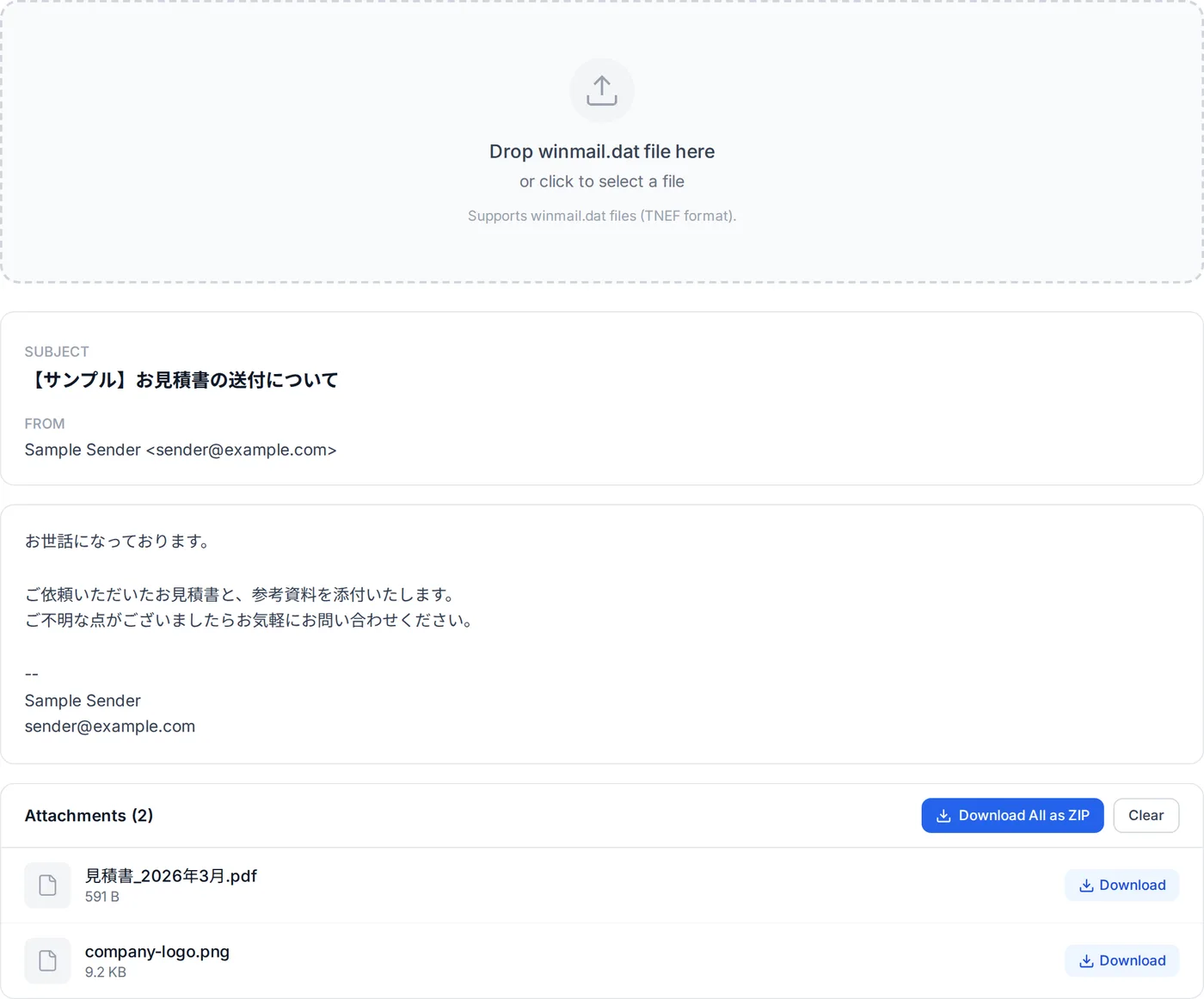
The winmail.dat viewer on this site reads the file in your browser without uploading it. What it does with the parts described above:
- It decides by the four signature bytes, not the name, so an ATT00001.dat opens the same way.
- It shows the subject and sender, preferring the MAPI properties to the older attributes when both are present.
- It shows the body from whichever form is there: plain text, HTML, or compressed RTF. An HTML message wrapped in RTF comes back as its original HTML; a message written as Rich Text is shown as its text, without the formatting. If the RTF is damaged, it says so.
- It lists the ordinary file attachments for saving one by one or together as a ZIP.
- It does not convert attached email messages or embedded OLE objects. If one appears in the list as a file, it may not open as it is.
Steps for Windows, Mac, iPhone, Android and Gmail are in How to Open winmail.dat, and for iPhone Mail in particular in Winmail.dat on iPhone. If you are not sure the file is TNEF at all, the file identifier checks the leading bytes.
Stopping it
Every fix in Microsoft's list for a recipient who gets Winmail.dat is on the sending side: turn off TNEF, for all messages or for that one. In practice that means asking the sender to send in HTML, or asking their administrator if the setting is the organisation's. Below the result, the viewer offers a short message asking the sender to switch to HTML, which you can copy or open in your mail app.
If you are the sender, the settings to check, in order, are in How to Prevent Winmail.dat. The .pst path and sign-in name mentioned above are one more reason to fix it.
Sources: Microsoft's "How message format affects email messages" and "TNEF conversion options" (Exchange Server), and the open specifications [MS-OXTNEF], [MS-OXRTFCP] and [MS-OXRTFEX].
Related Articles
How to Open winmail.dat on Windows, Mac, iPhone, Android and Gmail
Getting the message and attachments out on each platform.
How to Prevent Winmail.dat
Outlook's default format, single messages, and what to check when it still happens.
Writing a TNEF Parser So winmail.dat Never Leaves the Browser
The format byte by byte, and the details that break naive parsers.
Winmail.dat on iPhone: What to Do When You Receive One
Getting the attachments out in Safari, without installing an app.
Frequently asked questions
Is winmail.dat a virus?
Will renaming it to .zip or .pdf open it?
I opened the winmail.dat and there were no attachments in it.
Does the sender see winmail.dat as well?
About the author
Ren
Developer, OpenedFile
I build and maintain OpenedFile on my own. It started when a winmail.dat attachment landed in my inbox and nothing would open it — and every online converter I found wanted me to upload the file to their server first. So I wrote a TNEF parser from scratch instead, and every tool here has run entirely in the browser ever since.
More about OpenedFile